Resources
If there’s one guiding principle for how young people should approach AI, it’s this: use it to support learning, not to replace it. That means letting AI help with repetitive research or information-gathering, while keeping the critical thinking, the actual analysis, judgment, and decision-making in your own hands. Professionals in nearly every field already work this way: they use AI to organize and summarize large amounts of information, then make their own decisions based on that groundwork, rather than letting AI decide for them.
A good way to remember this: “Outsource the legwork, not the thinking.” Think of AI as a collaborator, not a shortcut to something that clears the busywork out of your way so you have more time and mental energy for the parts of the work that actually require you.
- Use AI to support learning, not replace it
- Avoid completing assignments with AI without understanding the material yourself
- Let AI handle repetitive research or information-gathering, but do the thinking yourself
- Treat AI as a collaborator, not a shortcut
- When in doubt: outsource the legwork, not the thinking
Developing a responsible mindset around AI is just as important as learning the tools themselves. Here are some starting points:
- Read primary research from organizations actively working on AI safety, like Anthropic and OpenAI, to understand how the people building these systems think about risk.
- Explore educational AI tools, such as Claude for Education, which is designed to encourage students to think through problems rather than simply handing them answers.
- Watch and read about responsible AI use. There’s a growing body of accessible content aimed at helping non-experts understand both the promise and the pitfalls of AI.
- Look into institutional frameworks, like the OECD’s due diligence guidance or corporate AI principles from companies like Google, to see how larger organizations are approaching accountability.
Resources from Anthropic
- Explains Anthropic’s reasoning on AI risks, timelines, and safety strategy: Core views on AI safety: When, why, what, and how \ Anthropic
- Shows the values and principles guiding Claude’s actual behavior and decisions: Claude’s Constitution \ Anthropic
- Data on how effective people across fields use AI tools: Anthropic Education Report: The AI Fluency Index
- Real usage patterns showing which subjects and tasks students rely on Claude for: Anthropic Education Report: How University Students Use Claude
- Overview of tools and features built for classroom and campus usage: Introducing Claude for education \ Anthropic
- Hub for Anthropic’s published papers on safety, interpretability, and model behavior: Research \ Anthropic
- Details the safety models Anthropic follows that grow more capable with time: Anthropic’s Responsible Scaling Policy
Tools for Students to Get Started
- Khan Academy – used if you want step-by-step help and lessons.
- ChatGPT – used for clear explanations or making practice questions.
- Perplexity – used if you need to summarize long notes or find info quickly to get short answers with sources.
- Quizlet – To remember things over time and study with AI.
- Torial – When you want to really understand a hard and specific topic and there isn’t a YouTube video explaining it, you can also make your own short explainer video in seconds with.
- Otter.ai – an AI-powered meeting assistant, transcribes lectures and meetings in real time, students can use it for automated note-taking. This AI tool can also generate lecture summaries, insights, and action items.
When to Use Which Tool
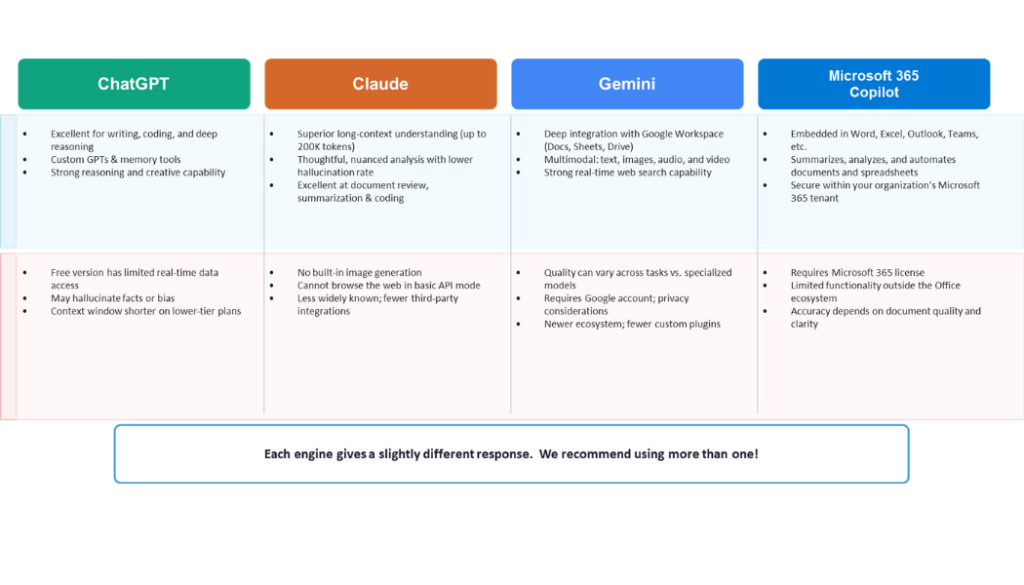
- ChatGPT: Best for brainstorming angles, writing video hooks, drafting outlines, and structuring first passes of scripts.
- Claude: Excellent alternative for long-form context retention, nuanced tone preservation, and conversational narrative feedback.
- Grammarly: Polishes phrasing, catches grammatical errors, and keeps brand
Resource from University of North Carolina Chapel Hill
Kenan-Flagler Business School